What is an EPUB file?
EPUB (short for electronic publication) is the most widely used open format for ebooks. An .epub file holds a book's text, images, fonts and table of contents in one package, and the text reflows to fit any screen, from a phone to an e-reader to a laptop.
What's inside an EPUB
An EPUB is really a ZIP archive with a fixed structure. If you rename book.epub to book.zip and open it, you'll find:
- Chapters written in XHTML, the same markup language as web pages.
- CSS stylesheets that control fonts, spacing and layout.
- Images, and sometimes embedded fonts, audio or video.
- A package file (content.opf) listing the title, author, language and reading order.
- A navigation document that powers the table of contents.
Because it's built on web technology, an EPUB can be read almost anywhere, and it's easy for software to check, convert and display.
A look inside an EPUB file
Because an EPUB is a ZIP archive, you can look inside one yourself: copy the file, change the ending from .epub to .zip and open it. You will find the same few pieces in almost every book.
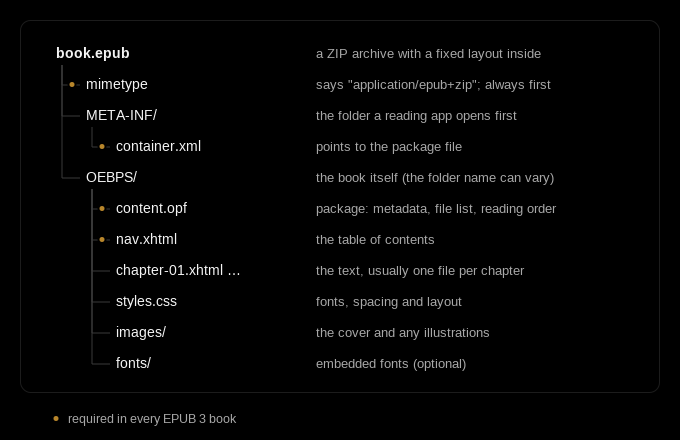
The mimetype file has to come first in the archive, uncompressed, which is how reading apps recognize the format straight away. META-INF/container.xml tells the app where the package document is. That package file, usually called content.opf, holds the title, author and language, lists every file in the book and sets the reading order, which the standard calls the spine. The navigation document becomes the table of contents you see in the app.
Reflowable vs fixed-layout EPUB
Most novels use reflowable EPUB: there are no fixed pages, so the text rewraps when you change the font size, typeface or screen orientation. That's what makes ebooks comfortable on small screens and accessible to readers who need larger text.
Fixed-layout EPUB keeps every page exactly as designed. It's used for picture books, cookbooks and some comics, where the position of text and art matters. The trade-off is that you zoom rather than resize the text.
Who maintains the standard
EPUB was created by the International Digital Publishing Forum (IDPF), which merged into the W3C, the organization behind web standards, in 2017. The current version, EPUB 3, supports modern HTML and CSS, right-to-left and vertical scripts, embedded media and strong accessibility features such as navigation by headings and text-to-speech.
Which apps open EPUB files
Apple Books, Google Play Books, Kobo devices and apps, Thorium Reader and the free Calibre library manager all open EPUB files directly. Kindle devices don't read EPUB natively, but Amazon's Send to Kindle service converts EPUBs for you. See how to open EPUB files for step-by-step instructions for every device.
What the standard says
The current version of the format is EPUB 3.3, published by the W3C. Its overview describes two kinds of book. In a reflowable book the reading app lays the text out on the fly to suit the screen and the reader's chosen font size. In a fixed-layout book the publisher sets each page, and can say how pages pair up into spreads and which way the screen should be held.
Every EPUB must also include a navigation document. The W3C treats it as the baseline for accessibility, because it lets any reader, including someone using a screen reader, move through the book by its structure. A companion specification, EPUB Accessibility 1.1, sets out what an accessible EPUB needs, such as meaningful headings, text descriptions for images and accessibility information in the book's metadata.
How to check an EPUB is valid
EPUBCheck is the official free validator, maintained for the W3C. Stores including Apple Books and Kobo run their own checks on upload, so an EPUB that passes EPUBCheck is far less likely to be rejected. Formatting tools such as Vellum, Atticus and Sigil can produce valid files directly, but it is still worth running the check after hand editing.
EPUB 2 and EPUB 3
Older ebooks may be EPUB 2, which used a separate NCX file for the table of contents and had little support for audio, video or scripts. EPUB 3 replaced the NCX with an HTML navigation document and added modern web features. Almost all current reading apps open both, and most EPUB 3 files still include an NCX so that very old devices can read them.
Where Ixonian fits in
EPUB is at the heart of Ixonian, which is being built now. Its reader opens EPUB books with adjustable text size, light, sepia and dark themes, page backgrounds and a blue-light filter, and it remembers where you stopped. Pre-register free.
Frequently asked questions
Is EPUB better than PDF for ebooks?
For reading text on different screens, usually yes: EPUB reflows to fit the screen, while a PDF keeps fixed pages that can be tiny on a phone. PDF is better when exact page layout matters. Read our EPUB vs PDF comparison.
Is EPUB free to use?
Yes. EPUB is an open standard, so anyone can create, sell or read EPUB files without paying a licence fee.
Can I edit an EPUB file?
Yes. Free tools such as Sigil and Calibre's built-in editor let you edit the text, metadata and styling. Since an EPUB is HTML and CSS inside a ZIP, anyone comfortable with web pages can work with one.
What does EPUB stand for?
Electronic publication. The file extension is .epub.
Can an EPUB contain audio or video?
Yes. EPUB 3 allows embedded audio and video, and "media overlays" that sync recorded narration with the text. Support depends on the reading app.