What is a CBZ file?
A CBZ file is a digital comic book: a ZIP archive full of page images, renamed with the .cbz extension. The Z stands for ZIP. Comic reader apps open the archive, sort the images by file name and show them one page at a time.
How a CBZ file works
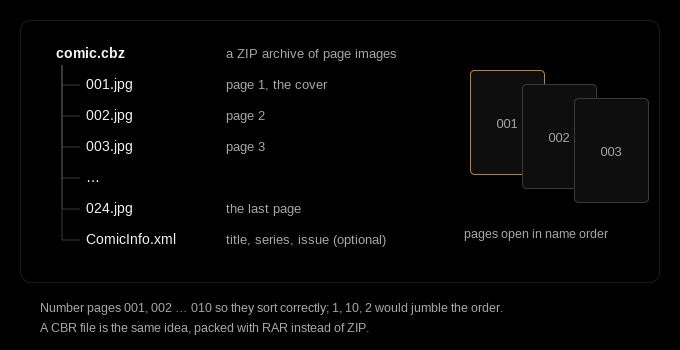
There's nothing special inside a CBZ. It's an ordinary ZIP file containing the pages as JPEG, PNG or WebP images, usually named so they sort in order: 001.jpg, 002.jpg, 003.jpg and so on. The reader app simply displays them in that order.
Many CBZ files also include a small ComicInfo.xml file. It stores details such as the series, issue number, writer, artist and summary, which comic library apps use to organize your collection.
What a CBZ looks like inside
Open a CBZ with any unzip tool and you will find nothing more than a folder of pictures. Comic readers sort them by file name, so careful creators number pages with leading zeros. An optional ComicInfo.xml file, a format that began with the ComicRack app, adds the title, series, issue number and credits.
CBZ and its relatives
- CBZ: pages in a ZIP archive. The most common and most compatible.
- CBR: pages in a RAR archive. See CBR vs CBZ for the differences.
- CB7: pages in a 7z archive.
- CBT: pages in a TAR archive.
All of them hold the same kind of images, so converting between them never reduces image quality.
How to open a CBZ file
You need a comic reader rather than an ebook app. Popular options include YACReader and CDisplayEx on computers, Panels and Chunky on iPad, and Mihon on Android. Self-hosted servers such as Komga and Kavita can stream your whole CBZ library to any device. Our comic book reader guide covers the features worth looking for.
Because a CBZ is a ZIP, you can also rename it to .zip and open the images with any file manager in a pinch.
How to make your own CBZ
- Export each page as an image, ideally all at the same width.
- Name the files with leading zeros (001, 002 … 120) so they sort correctly.
- Select the images and compress them into a ZIP archive, ideally without an extra folder inside.
- Rename the .zip file to .cbz.
- Optionally add a ComicInfo.xml file with the title and credits.
Metadata: ComicInfo.xml and its rivals
ComicInfo.xml is the nearest thing comics have to a metadata standard. It began in the ComicRack reader, sits in the root of the archive, and is read by most library apps. Its specification is now looked after by the open Anansi Project.
It is not the only scheme. ComicBookInfo stores its details as JSON in the ZIP file's comment field, CoMet is an older XML format, and MetronInfo.xml is a newer schema designed to fix gaps in ComicInfo. Tagging tools such as ComicTagger can write several of these at once.
Which image formats work inside
Comic archives usually hold JPEG or PNG pages; GIF and BMP are also widely accepted, and newer readers add WebP. JPEG suits scanned and painted pages, while PNG keeps flat colors and line art crisp. Whatever you choose, keep every page the same width so the reader app doesn't jump between sizes.
Why ZIP won
The ZIP format is open and built into every major operating system, while RAR belongs to RARLAB and needs its unrar tool or a compatible decoder to open. That is why library tools generally convert other comic archives to CBZ: tools such as comicbox can turn CBR, CBT and CB7 files into CBZ and carry the metadata across.
Where Ixonian fits in
Ixonian is being built for readers of every kind of story, and we know many of you read comics and graphic novels. Pre-register to hear first which formats Ixonian supports when it opens. Pre-register free.
Frequently asked questions
Is a CBZ file safe?
A CBZ contains images, not programs, so a genuine CBZ can't run code. As with any download, get comics from sources you trust and keep your reader app updated.
What's the difference between CBZ and PDF comics?
Both can hold comic pages. CBZ keeps the original images untouched and is easy to make and edit, while PDF is more universal for printing and sharing. Comic reader apps generally handle CBZ more smoothly.
Can Kindle read CBZ files?
Not directly. Free tools such as Kindle Comic Converter can turn CBZ files into a Kindle-friendly format.
Does a CBZ compress the pictures?
Hardly. JPEG and PNG pages are already compressed, so many tools store them in the ZIP without compressing again, which also makes the comic open faster.